PaperJam makes paper playable
PaperJam makes paper playable
Turning freehand sketches into musical instruments with a camera, AI and computer vision.
Turning freehand sketches into musical instruments with a camera, AI and computer vision.
Accepted and presented at IndiaHCI 2026
Accepted and presented at IndiaHCI 2026
Timeline
Timeline
3 Weeks
3 Weeks
April 2026
April 2026
Focus
Focus
Sketch-based interaction
Sketch-based interaction
Tangible interfaces + AR
Tangible interfaces + AR
AI recognition + CV tracking
AI recognition + CV tracking
Multimodal feedback
Multimodal feedback
Scope
Scope
Working prototype
Working prototype
Tools
Tools
Python + OpenCV
Python + OpenCV
Gemini 2.5 Flash-Lite
Gemini 2.5 Flash-Lite
Arduino + MediaPipe
Arduino + MediaPipe

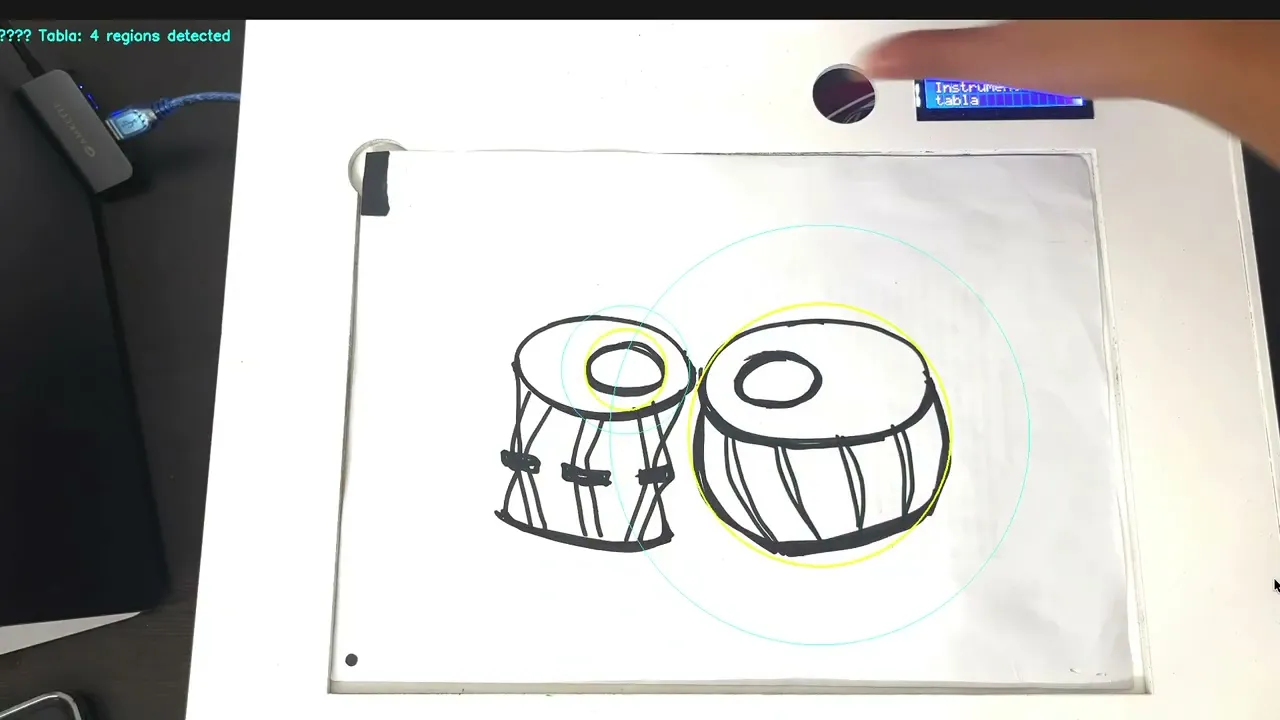
What if the instrument started as a drawing? PaperJam turns ordinary A4 paper into a playable interface. Draw an instrument, place the sheet on the tabletop, and use your fingertips to make music.
What if the instrument started as a drawing? PaperJam turns ordinary A4 paper into a playable interface. Draw an instrument, place the sheet on the tabletop, and use your fingertips to make music.
Watch the video
Watch the video
From a sketch to an instrument
From a sketch to an instrument
Draw your instrument
Draw your instrument
Draw an instrument of your choice on an ordinary A4 sheet using a marker. The sketch becomes the interface you will play.
Draw an instrument of your choice on an ordinary A4 sheet using a marker. The sketch becomes the interface you will play.
Place and scan
Place and scan
Position the sheet under the overhead camera. Cover the four green reference markers for one second to trigger the scanning process.
Position the sheet under the overhead camera. Cover the four green reference markers for one second to trigger the scanning process.
Recognise the sketch
Recognise the sketch
Vision AI identifies the instrument and selects its corresponding interaction handler. An LCD display and a short sound confirm that the instrument is ready.
Vision AI identifies the instrument and selects its corresponding interaction handler. An LCD display and a short sound confirm that the instrument is ready.
Play through gestures
Play through gestures
OpenCV tracks your fingertips and maps their movements to the playable areas of the sketch. An AR overlay highlights the interaction zones, allowing you to play directly on paper.
OpenCV tracks your fingertips and maps their movements to the playable areas of the sketch. An AR overlay highlights the interaction zones, allowing you to play directly on paper.

Still curious? Let's talk.
Drop me a line, tell me what you’re up to, or just say hi. If you’re building something interesting, I’d love to hear about it.
Still curious? Let's talk.
Drop me a line, tell me what you’re up to, or just say hi. If you’re building something interesting, I’d love to hear about it.


Play

Resume
About
Work
Home
Behance
Still curious? Let's talk.
Drop me a line, tell me what you’re up to, or just say hi. If you’re building something interesting, I’d love to hear about it.
Still curious? Let's talk.
Drop me a line, tell me what you’re up to, or just say hi. If you’re building something interesting, I’d love to hear about it.